
Pre-Event Preparation and Setup
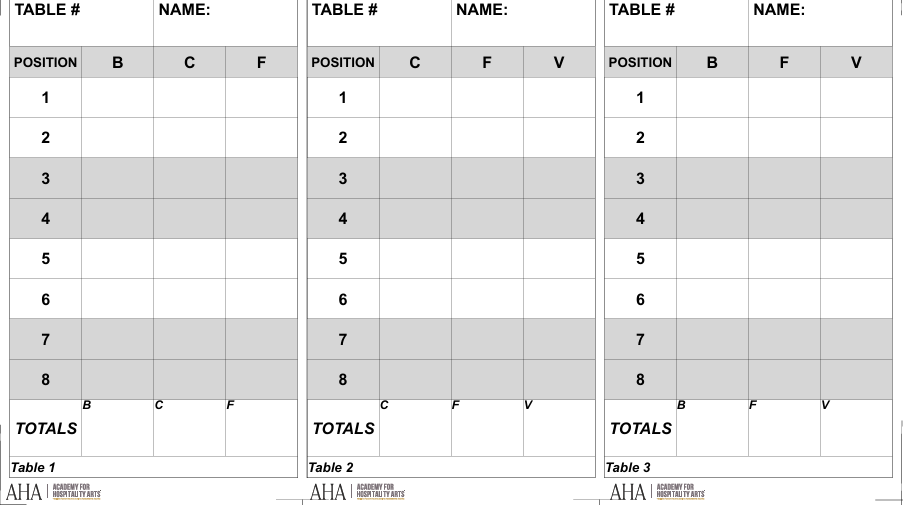
The Order Form
An order form is a document that captures the details of guests’ orders during plated, American, or hybrid service.
From a captain/manager perspective, the order form is a communication and control tool: you set the room’s system (table numbers/seat positions), assign ownership for capturing and verifying orders, and ensure accurate communication to the culinary team via the food expeditor.
The order form typically captures the table number, the position of the guest seated at the table, menu selections (often protein options and totals), and any dietary restrictions, dietary preferences, and special requests.
Captain/Manager Responsibilities (Before and During Service)
Confirm the table numbering and seat-position system matches the floor plan and is understood by the team.
Assign clear ownership for taking orders, verifying allergies/modifications, and delivering orders to the expeditor.
Set timing standards (when orders are taken, when cutoffs occur, how course timing is communicated).
Establish communication standards (approved abbreviations, how allergies/mods are flagged, and what must be verbally confirmed).
Best Practices (Managing Order Forms)
1. Review General Layout Details (Captain/Manager Oversight)
Table Count and Guest Count: Confirm the number of tables and the number of guests at each table to ensure correct guest settings.
Table Positions and Guest Location in Positions: Identify table positions (and if noted by the client, the names of any guests at these positions who are executives, VIPs, or have allergies). This allows the wait staff member to ensure they serve the correct beverage or food item to the correct guest.
Menu Offerings and Course Timing: Review the menu and confirm menu offerings (beverage and food items) with the bar staff and culinary team. Confirm the presence of allergens and clarify the culinary team’s ability to comply with dietary restrictions, dietary preferences, and special requests.
Dining room timing (“temperature check”): As captain, take a quick timing check on the floor before key service moments (e.g., clearing salad). If tables are not ready, hold the clear so the room stays synchronized (or so each table stays synchronized, depending on service style).
Firing a course (ready for pickup): Maintain active communication with the culinary team/expeditor on how long they need to fire the next course (i.e., have it ready for pickup), and use that timing to decide when to clear, reset, and stage the team for the next serve-out.
2. Capture Orders: Beverage Service
Captain/Manager oversight: Confirm who is taking beverage orders (and for which tables), where those orders are recorded, and when they are handed to the bar/expeditor so timing stays coordinated.
Service professional execution:
For alcoholic beverages, record the drink and any specific requests (e.g., cocktail style, wine pairing).
For non-alcoholic beverages, record the drink (soft drinks, juices, still water, or sparkling water), size, and any specific request (e.g., “no ice,” “no garnish”).
3. Capture Orders: Food Service
Food items: Record each menu item by position, documenting guests’ dietary restrictions, dietary preferences, and special requests. Clarify if these are modifications (e.g., “steak MR, dressing on the side, no onions”) or custom requests (e.g., “side of bread, extra sauce on the side”), and clearly flag allergens (e.g., “gluten allergy”). Ensure the culinary team’s ability to comply prior to service.
4. Consider Additional Service Modifications
Course Timing: Indicate if specific beverages and/or menu items need to be served together or at specific times.
Guest Needs: Note if a guest requires additional items such (e.g., utensils, condiments).
Service Notes: Clarify if there are any additional service notes.
5. Verify and Communicate the Order (via the Food Expeditor)
Service team should;
Position Details: Check the order is associated with the correct table and guest position.
Order Details: Check beverage service and food service details, including dietary restrictions, dietary preferences, and special requests.
Guest Verification: Repeat the order details to the guest to verify the order and to avoid misunderstandings.
Check Clarity: Ensure written orders are clear and concise.
Communication: Communicate the ordering to the culinary team through the food expeditor, remaining aware of prioritization, timing, and how dietary restrictions, dietary preferences, and special requests may affect both.
Serve out: Once collected, ensure that the order forms are organized in the order of table serve-out (i.e., VIP tables first).
The Expediting Sheet
An expediting sheet is a document managed by the food expeditor (which may also be a captain/manager) that consolidates order details for the entire dining room.
For the captain/manager, the expediting sheet functions as the master control view for accuracy and pacing, helping reconcile counts (including proteins), track allergies/modifications, and support prioritized serve-out.
In large events, it may not be practical for the expeditor/captain to rewrite every position’s full order onto the expediting sheet in real time. Instead, the expediting sheet is often used to capture room totals (e.g., counts by protein/entrée, allergy counts, priority tables) to communicate clearly with the culinary team.
Then, as order forms are collected, the expeditor/captain can organize the servers’ order forms in the serve-out sequence and call positions directly from the order forms to drive execution.
The expediting sheet typically lists table numbers, seat positions, selections (often protein options and totals), and spaces to document dietary restrictions, dietary preferences, and special requests. It consolidates the information captured across all order forms.